
Arnold's cat map
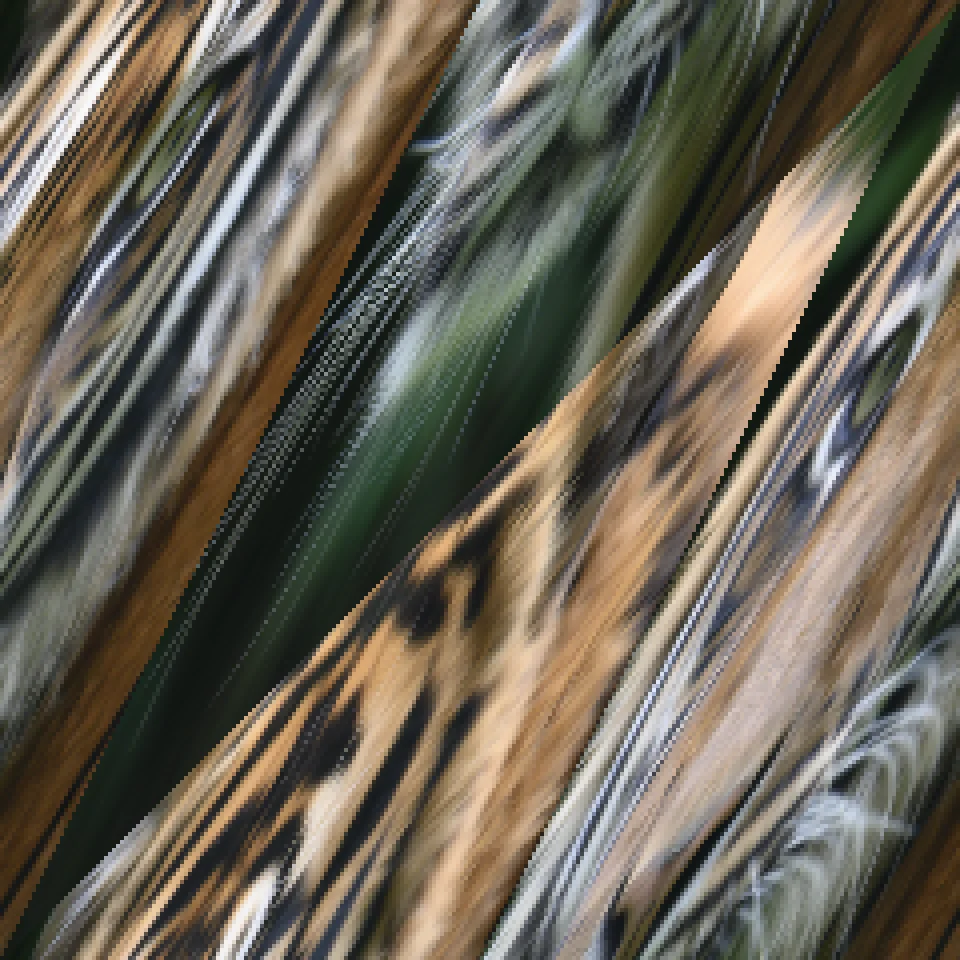
Take a square photo, stretch it into a parallelogram, cut off the pieces that stick out and fit them back into the square. Do it once and the photo is a blur of stripes; do it a few more times and it is pure noise. Keep going, and at one exact step the photo comes back, every pixel in its place. Try it with the tiger, an example or your own photo, change the size and see the number of steps jump from 12 to 300. The photo is cut to a square of Size × Size pixels. Each step stretches the square into a parallelogram, cuts off the parts that stick out and puts them back into the square. Press Play to watch the photo dissolve into noise and come back, Step and Back to go one step at a time, and the last button to jump to the step just before it returns. Drag Step or tap the chart to go to any step. Period is the number of steps until the photo is back; it depends on Size in a strange way, so try 124 (15 steps), 144 (12 steps), 101 (25 steps) or 150 (300 steps). Animate the stretch shows each step as it happens, Show the cuts draws the lines along which the square is cut. Open photo, a sample or drop a photo on the picture to use your own; it stays on your device.
How it works
- Press Play and watch the photo dissolve into stripes and noise and come back; Next step and Back move one step at a time.
- Drag Step or tap the chart to jump to any step at once, or use the last button to go to the step just before the photo returns.
- Change Size to change the period: 124 pixels return after 15 steps, 144 after 12, 150 only after 300. Try the other matrices too.
- Switch on Animate the stretch to see each step as a shear and a fold, open your own photo, and save the picture or open it in the editor.
Stretch, cut and fold
One step sends the pixel at (x, y) to (x + y, x + 2y), counted modulo the size of the square. In pictures: the square is sheared into a long parallelogram, 2.618 times longer in one direction and 2.618 times thinner in the other, and the parts that stick out are cut off and moved back by whole sides. Nothing is lost and nothing overlaps, because the matrix (1 1 / 1 2) has determinant 1: the step only shuffles the pixels.
Why the photo always comes back
A photo of N × N pixels can only be arranged in finitely many ways, and every step can be undone, so the pictures must eventually repeat, and the first picture to come back is the photo itself. The number of steps, the period, is the smallest t for which the t-th power of the matrix leaves every pixel in place. It is never more than 3N, but it jumps around wildly: 101 pixels need 25 steps, 124 need 15, 150 need 300 and 240 need 60. The chart under the picture shows how much each step looks like the photo.
Chaos on a grid
On a continuous square, with infinitely fine points, the cat map is a textbook example of chaos: two points that start almost together drift apart by a factor of 2.618, the golden ratio squared, at every step, and any blob of colour is soon spread evenly over the whole square. It never comes back. The return you see here is a consequence of the pixels: a finite grid cannot hold chaos forever. That mix of chaos and exact recurrence makes the cat map a favourite in the study of dynamical systems.
Frequently asked questions
Why is it called the cat map?
Vladimir Arnold illustrated the map in 1967, in his book with André Avez on ergodic problems, with a drawing of a cat's head that one step stretches into stripes. The name stuck, and pictures of cats have been scrambled with it ever since; the generator uses a tiger.
How many steps until the photo comes back?
That is the period, and it depends only on the size of the square, not on the photo. For Arnold's matrix it is 3 for 2 pixels, 12 for 144, 15 for 124, 25 for 101, 60 for 240 and 300 for 150. It is never more than three times the size. The Period tile shows it for the size you choose.
Does the picture get blurred or lose detail?
No. Every step moves each pixel to a new place without mixing colours, so the frame after the period is the photo exactly, pixel for pixel. The first steps only look blurred because neighbouring pixels land in long thin stripes.
Why does the photo sometimes appear upside down?
For some sizes the matrix raised to half the period sends every pixel (x, y) to (−x, −y), which turns the picture half a turn. With 50 pixels this happens at step 75 of 150. The chart marks that step and the Period tile mentions it.
Can I use my own photo?
Yes. Press Open photo or drop a photo on the picture. It is cut to its centre square and scaled to the size you choose, and it stays on your device. The pencil opens the result in the PictorX photo editor, where Apps ▸ Fractals ▸ Arnold's Cat Map also works on any open image.
Arnold's Cat Map: how do I record a video?
Press the red Record button in the playback bar: it films what the stage shows. Press it again to stop, and the video is saved to your device. Recording is free; you only need to sign in. Without a subscription the video carries a small PictorX logo in a corner. The button beside Record opens the video options: the shape (as shown, square, story 9:16 or wide 16:9), the length (until you stop, or 5, 10, 15 or 30 seconds for social media) and the file: MP4, WebM or an animated GIF. You can add one of three music tracks: calm, bright or beat.
Related tools
Arnold's cat map explained
How Arnold's cat map stretches and folds a square, why it is chaotic, why a picture made of pixels always comes back, how the period depends on the size, and what the cat map has to do with the Fibonacci numbers.
Strange attractor generator
Draw strange attractors from millions of points: the Clifford, Peter de Jong, Hénon, Ikeda, Gumowski–Mira and Tinkerbell maps. Drag to change the numbers, find new attractors at random, and read the Lyapunov exponent and fractal dimension.
Lyapunov Fractal
Draw Lyapunov fractals in your browser: type a sequence such as AB or BBBBBBAAAAAA, zoom into the swallows of Zircon Zity, and see where the logistic map is stable and where it is chaotic.
Double Pendulum
Simulate a classical double pendulum in your browser. Paint chaotic tip trails, long-exposure paths, or distort a soft field—then save a PNG.
Fractal generator: zoom into Mandelbrot, Julia and Newton fractals
Free online fractal generator: zoom about 5 trillion times into the Mandelbrot set, Julia and Newton fractals, jump to 64 famous spots and save a PNG.
Fractals
What is a fractal? How the Mandelbrot set, Julia sets, Newton fractals (including Newton⁴) and Nova fractals are made, and why zooming never runs out of detail.
Ready to try it?
Open PictorX in your browser — no install, no credit card required to start.
Go to Editor