

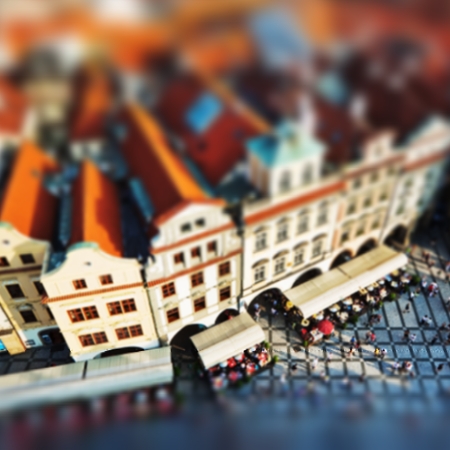
नीचे टिल्ट-शिफ्ट लुक आज़माएँ, या अपनी तस्वीर खोलें।
टिल्ट-शिफ्ट effect
Open a photo and apply टिल्ट-शिफ्ट in PictorX. This look is part of टिल्ट-शिफ्ट—adjust the settings on this page, then keep editing with layers, text, and other effects in the same workspace. नीचे टिल्ट-शिफ्ट लुक आज़माएँ, या अपनी तस्वीर खोलें।
यह कैसे काम करता है
- Open this page and try टिल्ट-शिफ्ट on the sample, or open your own photo.
- Tune the टिल्ट-शिफ्ट settings, or switch to another look in टिल्ट-शिफ्ट.
- Save the result, or keep editing with layers, text, and other effects in PictorX.
What the टिल्ट-शिफ्ट effect does
टिल्ट-शिफ्ट is one of the looks in PictorX टिल्ट-शिफ्ट. Apply it in your browser, then keep working in the same project—crop, type, or add another effect without starting over. Nothing is uploaded for this effect.
More looks in टिल्ट-शिफ्ट
This page opens टिल्ट-शिफ्ट with टिल्ट-शिफ्ट already selected. Switch looks on the demo to compare styles, or open the full टिल्ट-शिफ्ट page to browse every option in the set.
Looks in this set
अक्सर पूछे जाने वाले प्रश्न
Is the टिल्ट-शिफ्ट effect free?
Yes. Open this page in a modern browser to try टिल्ट-शिफ्ट as part of the free PictorX editing workflow.
Can I keep editing after I apply टिल्ट-शिफ्ट?
Yes. Apply टिल्ट-शिफ्ट, then keep using layers, text, and other PictorX tools in the same workspace.
How do I open टिल्ट-शिफ्ट from टिल्ट-शिफ्ट?
This page loads टिल्ट-शिफ्ट with टिल्ट-शिफ्ट selected. You can also open टिल्ट-शिफ्ट and choose टिल्ट-शिफ्ट from the looks.
संबंधित टूल
आज़माने के लिए तैयार?
अपने ब्राउज़र में PictorX खोलें — शुरू करने के लिए इंस्टॉल या क्रेडिट कार्ड की ज़रूरत नहीं।
एडिटर पर जाएँ